General Settings Panel
The General Settings panel is used to define settings, such as the types of proposals to exclude from proposal generation.

|
The General Settings panel displays on the Proposal Generation Settings screen. To access the Proposal Generation Settings screen, click the |
 (More) icon and then click the Proposal Generation Settings link in the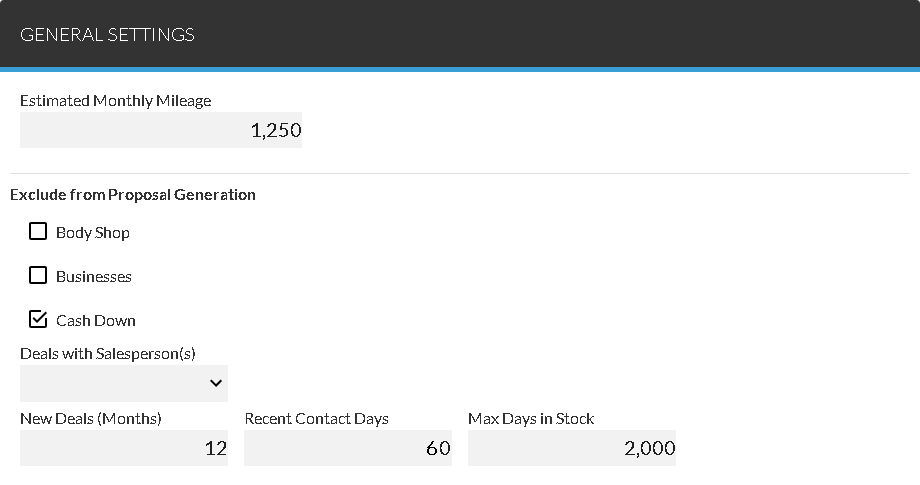
The fields in the Exclude from Proposal Generation section of the General Settings panel are used to define criteria to prevent unwanted proposals from being created. For example, to prevent proposals from being created for customers who have purchased vehicles within the last year, enter 12 in the New Deals (Months) field. For more information about how proposals are generated, refer to Proposal Generation Settings.
The following items are available in the General Settings panel.
Estimated Monthly Mileage: Enter the number of miles to add to the mileage of a customer's current vehicle for each month that the vehicle is not serviced at the dealership. The calculated mileage displays in the Estimated Mileage field in the Current Vehicle section of the Lead Sheet panel.
Body Shop: Select this check box to prevent proposals from being generated for customers with body shop appointments.
Businesses: Select this check box to prevent proposals from being generated for appointments for businesses.
Cash Down: Select this check box to prevent cash down proposals from being generated.
Deals with Salesperson(s): Select a salesperson whose previous deals should not be considered when generating proposals. Multiple selections can be made in this field. Click the  (Down Arrow) icon to display a list of valid entries.
New Deals (Months): Enter the number of months since a specific vehicle was sold. If the associated deal is more recent than the entered number of months, that vehicle cannot be used as the customer's current vehicle in generated proposals.
Recent Contact Days: Enter the number of days since a customer was last contacted. If a customer has been contacted more recently than the number of days entered in this field, no proposals are generated for that customer.
Max Days in Stock: Enter the maximum number of days a vehicle included on a proposal can be in stock. Vehicles that have been in stock longer than the number of days entered in this field are not included in proposals.
Click here for a list of products that may be mentioned in this help file.